
Vault - Password Manager App
Store all your usernames, passwords, URLs and notes in an AES encrypted database protected by one master password with this digital wallet.In this digital age, we practically do everything online- work, study, network with people, handle finances, shop and so on.
And with almost every “www” comes a login and a password.
Remembering all this data for multiple websites can be quite a nerve-wracking task and you probably find yourself tapping the “Forgot Password” button a little too often!
Vault could make your password management a whole lot simpler and highly secure.
Vault is an intuitive, secure and feature rich password keeper that simplifies management of all your confidential and sensitive information related to websites, email accounts, cards, bank accounts, etc.
Vault uses a strong data encryption standard and comes with features such as "Auto Destruct" and "Auto Logout" so you are guaranteed that your data is safe.
Even the UI has been designed to make it easy for you to access your data and keep it safe from prying eyes.
BENEFITS:- One-stop password manager to store all your private information related to banking, credit cards, email and websites.- The data you store on this password manager is completely secure and encrypted using industry standard 256-bit AES Encryption.- All your private information is available at your fingertips and can be accessed anytime with this password keeper - Access your data using a single master pass lock pattern which makes it easier to remember and quicker to input.
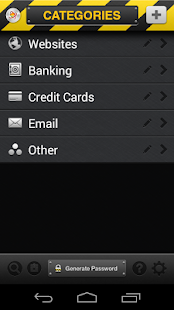
FEATURES:- Information on this password manager can be stored under five predefined categories: Websites, Banking, Credit Cards, Email and Other.- No limit on the number of records that you can save under each of the categories.- Extremely secure storage for passwords, usernames, PINs, credit card info and other details using 256-bit AES encryption.- User-enabled Auto Destruct feature which wipes out your data after 5 invalid login attempts.- User-enabled Auto Logout feature automatically logs off the application when idle.- Password Generator tool to create strong hack-proof passwords.- Password Strength Indicator.- Copy to clipboard functionality for each field and clear clipboard feature to erase the data after using.- URLs can be launched from this password keeper in your browser with just one tap.- Inbuilt search to find a record quickly by searching in title, URL, account or username.- Ability to add your own custom categories- Backup your Vault data using your Dropbox account- Restore your data from Dropbox in case of a device failure or Auto Destruct- Import data from your KeePass XML Files (v1.x & v2.x)
So now, you don’t have to store all your passwords in a diary, spreadsheet or in your head.
Safeguard your most confidential information using Vault and rest assured that your secrets are safely locked inside.
About Vault - Password Manager App
- Package name (App ID)
- com.xlabz.vault
- Available on
- Google Play
- Price
- Free
- Version
- v1.0
- Developer
- XLabz Technologies Pvt Ltd
Looking for the Vault - Password Manager App APK?
The safest way to get Vault - Password Manager App (com.xlabz.vault) on your Android device is to install it directly from Google Play — you'll always get the latest official version, automatic updates, and no risk of modified or infected APK files from third-party sites.
Social Features
Connect and share with friends and the community.
Weather Features
Get accurate weather forecasts and real-time updates.
Productivity Tools
Boost your productivity with powerful tools and features.
See Vault - Password Manager App in Action

Frequently Asked Questions
Is Vault - Password Manager App free?
Yes, Vault - Password Manager App is free to download and install on Android through Google Play.
How do I install Vault - Password Manager App on Android?
Open Google Play on your Android phone or tablet, search for Vault - Password Manager App by XLabz Technologies Pvt Ltd or tap the Google Play button on this page, then tap Install. The app downloads and installs automatically.
What is com.xlabz.vault?
com.xlabz.vault is the App ID (package name) of Vault - Password Manager App on Google Play. Every Android app has a unique package name, and it is the safest way to verify you are installing the official app.
Is Vault - Password Manager App safe to download?
Installing Vault - Password Manager App from Google Play is the safest option: you get the official version published by XLabz Technologies Pvt Ltd, verified by Google Play Protect, with automatic updates. Avoid APK files from unofficial third-party sites.

Get Vault - Password Manager App Today
Vault - Password Manager App for Android — free download on Google Play.
Compatible with Android phones and tablets — available on Google Play.
Ask AI about this app
Get instant answers about features, tips and more from popular AI assistants.